¶ Function: Call Recorder
This guide has been written originally by Luxferre, expanded by Anthrox.
This hack is safe meaning no changes are made to
/systempartition and changes are reverted back after factory reset or after an OTA update.
Minimum KaiOS 2.5.2 required.
(This feature works properly on KaiOS 2.5.2 version and is not supported on earlier versions)
¶ Activation methods
¶ Method 1: Wallace Toolbox
- Install Wallace Toolbox on the phone (you can use the WebIDE for this[1]).
- Run the program on the phone, on the screen you are interested in the option:
2: Call record ON/AUTO/OFF
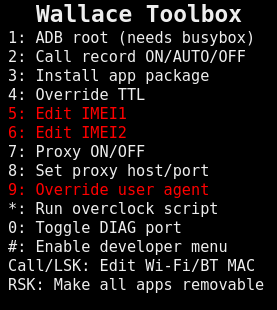
- Press the 2 key to select recording mode.
- (Optionally step) you can change more settings in WebIDE:
4.1 Run WebIDE and connect to your phone.
4.2 Go to OTHER -> Device Settings.
4.3 Now take a look at the screenshot:

A new version of the versatile Wallace Toolbox utility, allows to activate call recording from the standard menu.
All the changes can be reverted with a simple factory reset.
Video on YoutubeTested on Nokia 2720 Flip & Nokia 800 Tough but can work on any KaiOS device with Busybox present (and even where it isn't present, it can be easily installed with OmniBB or similar utility program).
¶ Method 2: WebIDE
Hint: If you have used Method #1: Wallace Toolbox before, you do not need to manually enter the following values.
- Connect with WebIDE, go to the "Device Settings" and set the following:
callrecording.mode = on or auto (manual or automatic recording)
callrecording.notification.enabled = false (popup message with start/stop status)
callrecording.vibration.enabled = true (discreetly vibrate when starting recording)
callrecording.file.format =wav> (other file formats:3gpp,ogg,opus)
Now, if your KaiOS phone has a Camera button, recording will be toggled with it. If there's no Camera button, recording can be toggled by pressing Left arrow, a "REC" icon will appear.
The resulting files will be stored in the "callrecording" directory of your main storage (internal or sdcard).
¶ Known issues
Call Recorder feature is under development, not all functions work properly. Here are some ways to fix known issues temporarily.
¶ Cutting off conversations
Problem: If the display will be extinguished, we can only record ~ 2:00 - 4:00 minutes of conversation. We will also hear an ugly clicking effect.
Repair method:
Don't let the display turn off while calling.
Settings -> Personalization -> Display -> Screen Timeout -> Never
Warning: This repair method is not perfect, but it partially solves the problem.
If the keypad is locked when someone calls us, the display will turn off during an incoming call

¶ Missing "callrecording" folder
Problem: Recording function is enabled, but after calling I can't see the "callrecording" directory in internal location in File Manager.
The phone automatically creates a "callrecording" folder, but in internal location is HIDDEN.
Repair method #1:
Use the search engine in the File Manager to show the missing folder in internal memory.
Repair method #2 (microSD card is required):
Change default save location in Settings from Internal to SDCard.
Repair method #3:
Install File Manager modded by Anthrox/TheCompanyPL with unlocked visibility "callrecording" folder in internal memory.
¶ Unable to delete files in "callrecording" folder
Problem: Cannot delete any files inside the 'callrecording' folder if save location is set to "SDCard".
Repair method #1:
Change default save location in Settings from SDCard to Internal.
Repair method #2:
Delete the "callrecording" folder.
Warning: This repair method is not perfect, but it partially solves the problem.
¶ FAQ
¶ Can I save files to subfolders?
Question: Could the phone save files to subfolders?
e.g.:
/callrecording/MOM/*.wav
/callrecording/GIRL/*.wavMOM, GIRL sub-directiory names read by phone automatically from the Contact.
or/and change
*.wavfile name template e.g.
NUMBER_TIMENUMBER_OUTGONING_0_1.wav
to
NUMBER_TIMENUMBER.wav
Answer:
We currently don't know the answer.
How to install Wallace Toolbox on KaiOS using WebIDE ↩︎