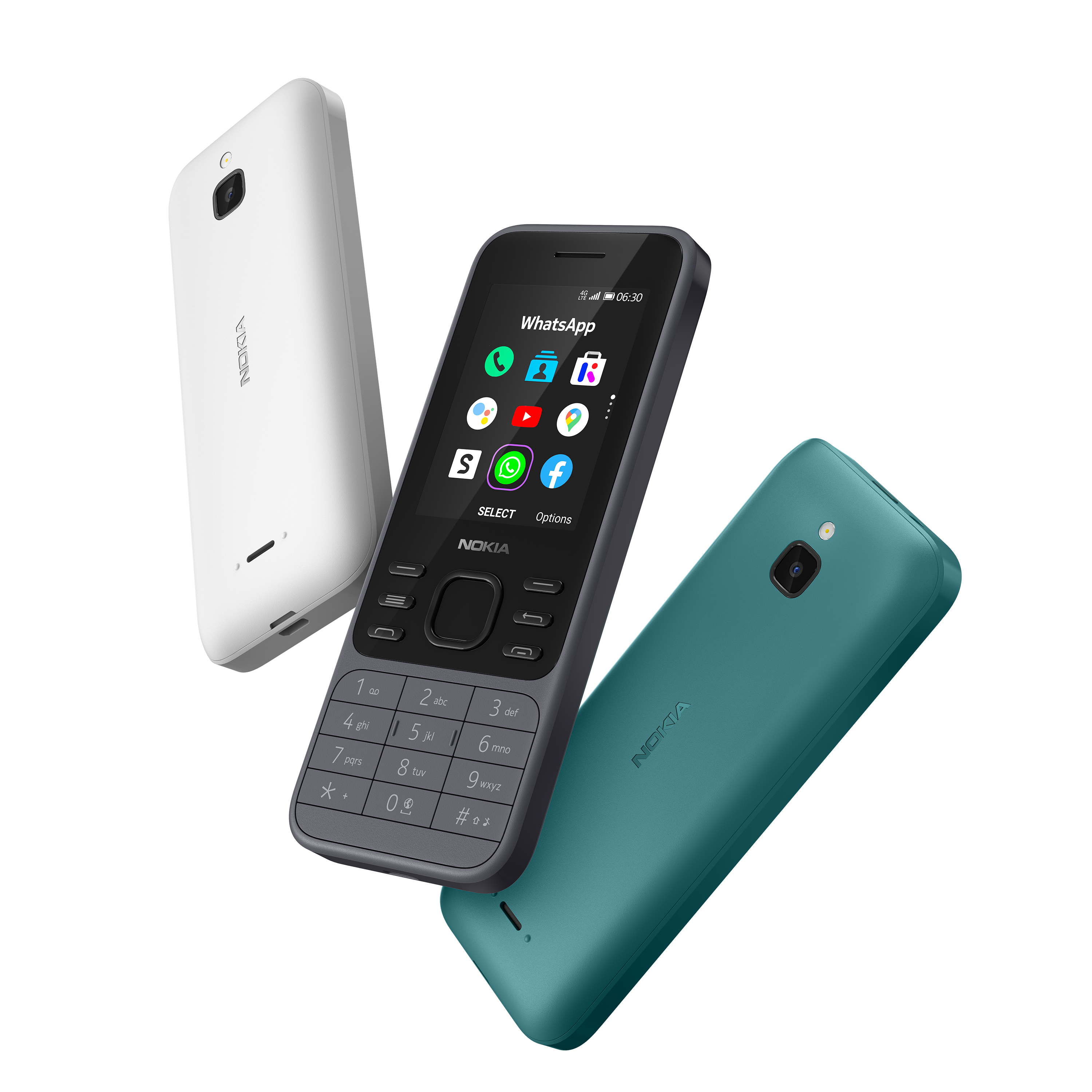
¶ Don't buy a counterfeit
By the time you're reading this, the 6300 4G has been well past its lifespan on the shelves, and HMD no longer sell the phone. If you were to buy it right now, you will most likely buy an used or refurbished version.
However, when you do a quick search on eBay, Shopee and other online shopping sites across North America, Europe and Southeast Asia, you may see hundreds of listings of used 6300 4G in various conditions. Although the listings seem to look identical, be warned that many of those are NOT genuine but are knock-offs with terrible build quality and user experience.
-
Brand-new KaiOS phones, even when off the shelves, don't cost less than 2/3 of their retail prices.
-
HMD has never sold 2G-only version of any of its KaiOS devices in its official capacity. All KaiOS phones from HMD are well-equipped with 4G LTE, Wi-Fi and Bluetooth. KaiOS devices are required to have 3G at minimum.
-
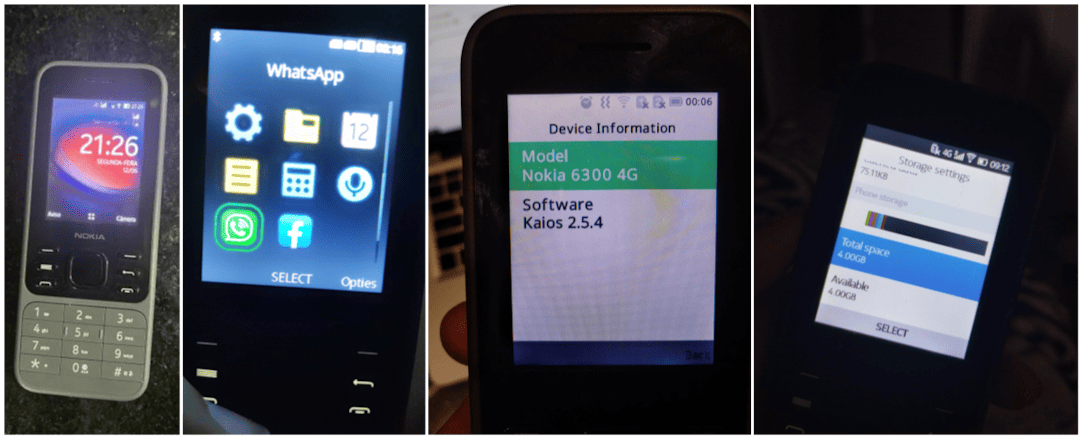
If the seller only uploaded generic photos showing the phone's exterior, ask for some additional photos of the box it came in. A genuine phone's box would show all its features on the fine print, as well as an information sticker indicating its model number (which matches the device specifications below) and targeted regional market.
Note: Check the model number on the packaging box with that on another information sticker under the battery, and when dialing
*#0000#in the operating system! -
Look for signs of the phone running KaiOS and not MRE: KaiOS uses the distinct Open Sans UI font and vibrant, properly aligned UI elements. KaiStore and related services should be available at all time. It does NOT run Opera Mini 4.4 or other Java/MRE apps.
Photos provided by thurmendes on r/KaiOS Discord server in June 2023 and various Reddit posts (second, third, fourth).
¶ About Kosher phones
Kosher is a category of devices whose software and sometimes hardware are heavily modified to limit access, or remove content and features deemed distracting or against religious values, while keeping other features and the user interface almost identical to the original. There are companies specialising in making Kosher phones, and you can find Kosher phone listings on eBay being advertised as productivity and focus improvement tools.
Because the build and UI remain identical, it's difficult to tell Kosher phones and genuine ones apart. However, there are a few generic ways to differentiate them:
- there might be logos embedded on hardware and/or splash screen displayed on the boot sequence to indicate a Kosher phone (original only shows 'enabled by KaiOS' followed by the Nokia logo and chime);
- Browser, KaiStore and other bloat games are missing even if you have an active cellular service; links in Messages don't work; options to manage KaiOS accounts in Settings are greyed out (depending on each variant, WhatsApp and APIs it relies on might go missing or be intentionally left in);
- no options to toggle ADB and DevTools access: dialing
*#*#debug#*#*triggers nothing; cannot boot into Recovery mode; getting access to EDL mode varies
Kosher is indeed a great way to make your phone truly basic, but HMD already offers more basic phones with 4G in their feature phone lineup, so the choice is yours.
Photo provided by nuxx on r/KaiOS Discord server in October 2021.

¶ Differences between US/CN and international variants
North America (US, TA-1324) and Mainland China (CN, TA-1287) versions are customised differently from other 6300 4Gs to comply with local regulations.
TA-1324, approved by the three major US carriers, Verizon, AT&T and T-Mobile, only works on LTE bands 2, 4, 5, 12, 17, 66 and 71. Its modem doesn’t cover global LTE bands (e.g. band 1, 3 and 7), so you may have trouble making or receiving calls and texts overseas. Even then, it lacks band 13, which Verizon primarily uses for VoLTE and coverage in rural area. Other models are also barely compatible with US networks, with only band 5 shared across all; except TA-1307 which also shares LTE band 2 and 4.
On the TA-1324, you can only select English (US), español (US), Français (CA) and Português (BR) as display languages. On the TA-1287, you cannot set Google as a search engine (Baidu is set as default). WhatsApp, Facebook, YouTube, Google Maps and Google are not pre-installed, though you can get the former two from KaiStore.
Although you can still install third-party apps on TA-1324 with ADB and WebIDE as with the other versions, rooting is currently not possible as it is signed with a different PK_HASH signature for handshake in EDL mode. This requires a separate programmer which we don't have in archive. Without root access, you can still use AppBuster to hide unwanted apps from the app list instead.
¶ Tips and tricks
- You can take a screenshot by pressing both * and # keys at the same time.
- If you want to have tactile responses for each keypress, go to Settings, Device, Accessibility and turn on Keypad vibration. NOT recommend turning this setting on since the phone only has one mode of vibration, and it’s really strong, which could be annoying and could drain the battery as a rollercoaster.
- You don’t need a KaiOS account to use your phone or download apps from KaiStore, but you can create one in Settings, Accounts to use Anti-Theft features.
- To stop getting ad notifications from KaiStore, go to Settings, Personalization, Notices, App notices, Store and turn off Allow Notices. Then go to Store, Options, Settings & Account, Show rich content and select Do not show.
- Or to block KaiAds altogether, add
ssp.kaiads.comin your Wi-Fi routers' blacklist or the system'shostsfile. Note that this might prevent you from installing certain apps from KaiStore like WhatsApp.
- Or to block KaiAds altogether, add
- Speed Dial lets you call a contact quickly by pressing and holding a number key from 2 to 9 on the homescreen. To assign a contact to a number key, press and hold an unset key while on the homescreen, or go to Contacts, Options, Settings, Set Speed Dial Contacts. You can also change your voicemail number in the same menu.
- ICE (In Case of Emergency) Contacts, however, is an useless feature on this phone, since there's basically no way to activate it. On devices with side button like the Nokia 2720 Flip, you could hold or double-press the side button to trigger SOS Call.
- You can use a GIF as your homescreen wallpaper, but it will drain your battery faster.
- If you prefer a different layout than the default 3-by-3 grid view, you can choose Options, List view/Single view and rearrange the items as you like.
- Readout is a hidden accessibility feature for blind and visually-impaired users, which reads the focused content on your screen and your selection out loud. To toggle Readout, turn on debugging mode on the phone and connect it to a WebIDE session (see ADB and WebIDE), then toggle the
accessibility.screenreaderDevice Settings boolean flag. This feature might not work well with some third-party apps which have unlabelled buttons.
¶ Known issues
- Be gentle when opening the back panel; if you open it too often or put too much force, the plastic clips holding the panel might be stressed and ultimately fall apart.
- Note that phone shutting itself down or not receiving any power usually come down to loose or dirty battery connectors or charging port, and not software problem. Happened to me once, got the phone repaired for less than $10.
- Decent speaker, but can be muffled on strong bass. Note that while this phone does have a 3.5mm headphone jack and supports playing FLAC files though third-party audio players, the audio output quality is very much not comparable to Sony Walkman's.
- Keypad frequently registers multiple or no keypresses when pressing once, partly due to the small keypad design with only enough space for fingernails, and keypress timeout interval in
keyboard.gaiamobile.orgbeing too short. [BananaHackers' guide on fixing the keypad speed] may help - Battery drains quickly (from 3–5 days of 4G standby to about 18 hours, or 2 hours in active usage) if you leave Wi-Fi or mobile data on, e.g. to be notified of incoming WhatsApp messages. Turn them off if you don't plan to use Internet connection, and turn them on periodically to check for notifications.
- A-GPS fails to lock your current position on 4G LTE, possibly due to interferences with TDD bands. A workaround is to switch to 2G/3G to get GPS signal: Settings, Mobile network & data, Carrier - SIMx, Network type, 3G/2G. Might be a major issue for those in the US where 2G/3G have been shut down.
- RAM optimizations leading to the phone joining Doze deep sleep and aggressive background task killing after a few minutes, making opening or exiting apps horribly slow, and notifications—including incoming WhatsApp calls—being delayed.
- Wi-Fi hotspot will also stop transmitting data packets with your other devices when you put the phone into sleep. As a workaround, you can have [a playlist of silent MP3s played in background] to prevent the phone from Doze sleep.
- This can be permanently mitigated by modifying startup scripts in /boot to disable the Low Memory Killer module, which will be mentioned in [Manual patching with Android Image Kitchen] below.
- Predictive typing mode doesn't last between inputs, meaning if you switch between input boxes, it'll return to the normal T9 mode. To override this, modify
keypad.jsinkeyboard.gaiamobile.org, setthis.isT9Enabled=trueand priotise T9 in the typing mode list (kudos to [mrkisl in r/KaiOS Discord server]) - On certain network providers where this phone isn't yet certified, such as Jio Reliance in India, you might [temporarily mute yourself on phone calls with VoLTE/VoWiFi enabled]. Putting yourself on hold and off does ease the problem.
- Normally, you can wake up the phone from sleep by either pressing the Power, Volume up or Volume down buttons, regardless of whether lock screen is in place or not. On this phone there are no volume buttons, but some of their functions, such as triggering boot modes or waking the phone up, are mapped to * and # respectively. This can be problematic as those keys are located close to the bottom edge of the phone and can be randomly mashed if you store the phone in your front pockets, leading to [unintended screenshots].
- If you forgot your lockscreen passcode (not SIM or Anti-Theft ones), you can [bypass it] by holding down the top Power button, then select Memory Cleaner → Deep Memory Cleaning.
- According to reports from GSMArena and Reddit, some call and text entries may not be registered in the log. I haven't been able to replicate this during my usage however, could be related to other mentioned issues.
¶ Secret codes
tip: Save these codes as contacts or as Speed Dial entries for quick use later. Dial and press Call to activate a code's function when it shows in the suggestion list.
*#*#33284#*#*(*#*#debug#*#*): Toggle debugging mode, allowing the phone to be debugged over ADB and DevTools (see ADB and WebIDE). A bug icon will appear in the status bar letting you know debugging mode is on. This can also be turned on under Settings, Device, Developer, Debugger, ADB and DevTools.*#06#: Display the 15-digit International Mobile Equipment Identity numbers or IMEI(s) to uniquely identify a cell phone on GSM networks. Do not modify, delete or show these numbers to anyone else: invalid or duplicated IMEI(s) will prevent you from receiving cellular signals or even get you into legal trouble.*#0606#(TA-1324 only): Display the 14-digit Mobile Equipment Identifier numbers or MEID(s) to uniquely identify a cell phone on CDMA networks. Note that this only applies to US models; on international models the MEIDs would be invalid (all zeroes) and thus this secret code does nothing.*#0000#: Display device information, including firmware version, build date, model number, regional variant and CUID.*#33#(call): Check the Call barring service status from carrier, which is used to block or whitelist calls, whether incoming or outgoing, domestic or international. Requires a 4-digit passcode. To toggle this feature, go to Settings, Network & Connectivity, Calling, Call barring.*#43#(call): Check the Call waiting service status from carrier. To toggle this feature, go to Settings, Network & Connectivity, Calling, Call waiting.*#*#372733#*#*(*#*#draped#*#*): Open KaiOS MMI Test, an internal tool used by OEMs to test the hardware components of a KaiOS device. Tests are done automatically or manually, and include LCD backlight, T9 keyboard, camera, LED flash, RTC, speaker, microphone, vibrator, 3.5mm audio jack, SIM trays, Wi-Fi, Bluetooth, NFC, microSD and microUSB slots.- In the manual speaker test, you may hear some English and Chinese dialog from a female speaker, which transcribes to: Hello. Please dial 110 for police, 119 for fire, 120 for ambulance, 122 for traffic accidents, and dial area code before 112 for six full obstacles (?). 110 and 119 are the emergency numbers for police and fire department services in Japan, although the ambulance service is also 119, not 120.
¶ Codes that don't work
*#07#: Check thero.sar.enabledboolean property, if true check the current SAR level and display SAR-related health and safety information.*#1219#: Clear all userspace customizations, presumably for in-store display.*#091#(on)/*#092#(off): Toggle auto-answering on incoming call. You can also turn this on under Device Settings in WebIDE.*#2886#(*#auto#): Should also open KaiOS MMI Test interface.*#8378269#(*#testbox#) OR*#*#2637643#*#*(*#*#android#*#*): Open Testbox engineering menu to test hardware components — can be manually opened using Luxferre's CrossTweak.###2324#(###adbg#): Open a menu which allows toggling Qualcomm diagnostic mode for fixing null/invalid IMEI or baseband via QPST.*#*#212018#*#*: Toggle privileged access (including root ADB shell) to the phone.*#7223#(*#race#): Display internal firmware build and boot image versions.*#*#0574#*#*(*#*#0lri#*#*): Open LogManager utility which allows you to fully enable ADB and DevTools on Spreadtrum devices.*#573564#(*#jrdlog#): Open T2M Log (jrdlog), a stripped-down LogManager interface.*#1314#: Switch theauto.send.crash.smsproperty, whose purpose is still unknown.
¶ Special boot modes
Exit these modes by removing and re-inserting the battery, or type and execute the commands provided for each mode.
¶ Recovery mode
Press and hold the Power button on the top of the phone and the * key while the phone is powered off, or type and execute adb reboot recovery while the phone is in debugging mode and connected to a computer. Use D-Pad Up and Down keys to move between options, and press the Power button on the top (not the center OK key) to select.
Default recovery interface only allows you to factory reset the phone and start fresh by wiping /userdata and /cache, view boot and kernel logs should the operating system fails to start, and install patches with adb sideload or from SD card. Using EDL mode, you may be able to replace the default recovery interface with a custom one for more features, such as ADB support.
hint: /recovery partition has the same 32.0 MB (32,768 KB) size as /boot, meaning that you can replace /recovery with a copy of /boot for booting into KaiOS, and reserve /boot for i.e. installing other operating systems such as postmarketOS.
¶ Fastboot mode
fastbootd is a component of the Android bootloader. It allows you to write system partitions in situations where your phone cannot boot normally, or execute manufacturer-specific operations with fastboot oem commands, e.g. unlocking the bootloader to flash custom ROMs.
On the 6300 4G, it is only accessible and will automatically kick in when both /boot and /recovery are corrupted; to manually activate this mode, use dd to wipe both partitions with zeroes. In this mode, the phone only shows a still of the boot splash — the white Nokia logo on a black background.
From here, to interact with the interface, you need to connect your phone with an USB cable, and use the fastboot CLI tool on your computer:
- On macOS and Linux,
fastbootshould be included in theandroid-toolspackage, which you can install from Homebrew or from your operating system's package manager; - On Windows, you can get
fastbootfrom the Android SDK Platform Tools package; you may also need to download and install Google's generic driver for your computer to detect your phone in Fastboot mode (right-click theandroid_winusb.inffile and click Install; requires admin rights).- Otherwise, open Device Manager (Win + R
devmgmt.msc) and look for anAndroiddevice with an exclamation mark, right click and select Install Driver..., Browse my computer for drivers, Let me pick from a list of device drivers on my computer, Have Disk... and select the INF file. - Once the driver is installed, you should see your phone in the list as
Android Bootloader Interface.
- Otherwise, open Device Manager (Win + R
Once done, you can exit Fastboot mode with fastboot reboot.
For a list of commands commonly found in the Fastboot interface, see the Android/Fastboot entry on Gentoo Linux Wiki. Note that not all commands can be used on the 6300 4G.
¶ EDL mode
Press and hold the Power button on the top of the phone and both the * and # keys until the phone vibrates, or type and execute adb reboot edl while the phone is in debugging mode and connected to a computer. Boots into a black screen.
In this mode, you can read and overwrite the partition table at the manufacturer level, over Qualcomm's proprietary Sahara or Firehose (QD-9008) diagnostic protocol. Interacting with the phone requires a digitally-signed MBN/ELF programmer file specifically made for the device, and a middle-man program such as QFIL or edl.py.
Instruction on setting up and interacting with the phone filesystem via EDL mode can be found on its separate Wiki entry.
An EDL programmer for the non-US variants of 6300 4G (other than TA-1324) can be found on BananaHackers' EDL archive website with hardware ID 0x009600e100420029. TA-1324 variant has been signed with a different PK_HASH and needs a different firehose loader which we currently don't have in archive.
¶ UART debugging testpoint
As discovered by atipls on Discord and @Llixuma, on the mainboard of the 6300 4G, there are 3 UART testing points: TX, RX and GND just above the SIM2 slot. Shorting TX at 1.8V and GND takes you to Fastboot mode and the Linux terminal interface.

By default, KaiOS's Linux kernel disables the UART testpoints; logs from UART testpoints will stop once the kernel kicks in. To read the full output from UART, compile the Linux kernel from HMD's open-sourced kernel release with LEO_defconfig flag (not LEO_defconfig-perf).
You can also force reboot the phone at any time by pressing and holding the top Power button and the # key.
¶ ROOT: Patching the boot partition (non-US only)
¶ Source code
TODO
¶ See also
- Nokia 6300 4G product page on Nokia Mobile's website
- Nokia 6300 4G review by PC Magazine
- Discussion: Nokia 6300 4G and Nokia 8000 4G on 4PDA Forum (Russian)
- Nokia 8000 4G and Nokia 6300 4G general discussion thread on BananaHackers Google Groups
- Nokia 8000 4G rooting research thread on BananaHackers Google Groups
- Nokia 6300 4G (nokia-leo) on postmarketOS Wiki
- Affe Null's Bananian project repository, a Debian port for KaiOS devices
¶ Device specifications
- Released: 13 November 2020
- Model: TA-1286, TA-1287, TA-1291, TA-1294, TA-1307, TA-1324
- SoC: Qualcomm MSM8909 Snapdragon 210 (4 × 1.1GHz Cortex-A7)
- RAM: 512MB LPDDR3
- GPU: Adreno 304
- Storage: 4GB eMMC 4.5 (+ up to 32GB microSDHC card)
- Network: 2G GSM, 3G UMTS, 4G LTE Cat4 150/50Mbps; supports VoLTE and VoWiFi
- EU (except East Ukraine, Azerbaijan, Georgia), APAC: band 1, 3, 5, 7, 8, 20
- MENA, CN, Nigeria, Tanzania: band 1, 3, 5, 7, 8, 20, 28, 38, 39, 40, 41
- US: band 2, 4, 5, 12, 17, 66, 71
- Latin America (LATAM): band 2, 3, 4, 5, 7, 28
- Rest of the World (ROW): band 1, 3, 5, 7, 8, 20, 38, 40
- SIM: Single or Dual SIM (Nano-SIM, dual-standby)
- Screen:
- Main: 320 × 240 at 167 PPI; 2.4-inch TFT LCD, 16M colours
- Bluetooth: 4.0, A2DP, LE
- Wi-Fi: 802.11b/g/n, 2.4GHz, Hotspot (up to 8 devices)
- Peripherals: GPS & GLONASS
- Cameras:
- Rear: VGA with fixed focus, LED flash
- Dimensions (HWD): 131.4 × 53 × 13.7 (mm) / 5.17 × 2.09 × 0.54 (in)
- Weight: With battery: 104.1g (3.67oz)
- Ports:
- USB 2.0 microUSB; supports charging and data transfers
- 3.5mm headphone jack
- Battery: Li-Ion 1500mAh, removable (BL-4XL), 5W wired charging (up to 25d of 4G standby advertised)
- KaiOS version: KaiOS 2.5.4 (CN: KaiOS 2.5.4.1)
- Kernel version: 4.9
- WhatsApp VoIP: Supported (12.00.17.01 onwards)
- Build numbers: 10.00.17.01, 12.00.17.01, 13.01.17.05 (CN), 20.00.17.01, 30.00.17.01